
MagFone Announces New iPhone Data Recovery Solution Supporting Recovering Data from iPhone and iPad in 3 Recovery Modes
KOWLOON, HONGKONG, 27th January 2026, ZEX PR WIRE, MagFone, a rising innovator in mobile data management solutions, today announced the release of its latest MagFone iPhone Data Recovery, a powerful and user-friendly tool designed to help users recover lost or deleted data from iPhone and iPad in three flexible recovery modes: directly from the device, from iTunes backups, and from iCloud backups.
As data loss continues to affect millions of iPhone and iPad users due to accidental deletion, system crashes, forgotten passwords, failed updates, or device manage, MagFone iPhone Data Recovery delivers a comprehensive, reliable, and accessible recovery experience for both everyday users and professionals.
Three Flexible Recovery Modes for Maximum Data Protection
MagFone iPhone Data Recovery stands out by offering three complete recovery modes, ensuring users can retrieve data from iPhone and iPad no matter how the loss occurred.
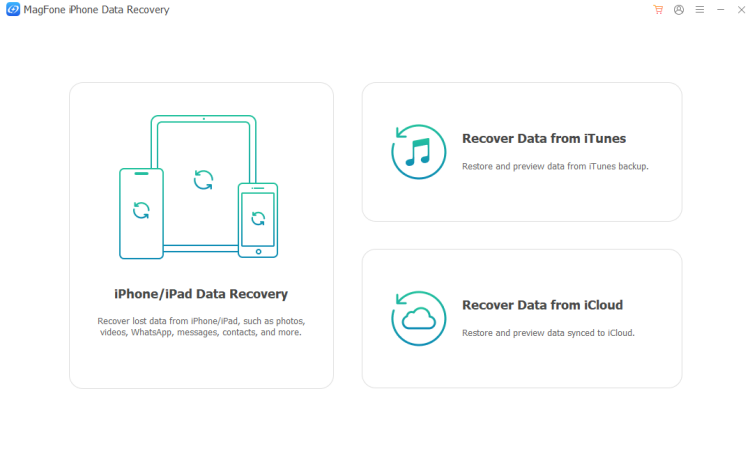
Recover Data from iOS Device (No Device Backup)
With device-based scanning technology, users can connect their iPhone or iPad to a computer and perform a deep scan to recover data even without an existing backup. This mode supports the recovery of photos, videos, contacts, messages, notes, call history, app data from WhatsApp, and more, which is ideal for users who never enabled backup features.
Recover Data from iTunes Backup (No Data Overwrite)
Unlike traditional iTunes restore methods that overwrite existing data, MagFone iPhone Data Recovery allows users to scan and extract specific files from iTunes backups without affecting current device content. This selective recovery approach gives users full control over what they restore, making the process safer and more efficient.
Recover Data from iCloud Backup (No Reset Required)
Users can securely sign into iCloud with their Apple ID credentials and access synced backups for preview and selective data restoration. MagFone iPhone Data Recovery eliminates the need to reset the device to the default settings, allowing users to retrieve important files quickly while keeping their current data intact.
Designed for Ease of Use and Professional Reliability
MagFone iPhone Data Recovery combines advanced technology with an intuitive interface, making professional-level recovery accessible to everyone. With just a few clicks, users can scan, preview, and restore lost data without technical expertise.
Key benefits of MagFone iPhone Data Recovery include:
-
Support for a wide range of data types like photos, messages, contacts, app data, and more
-
Compatibility with the latest iOS and iPadOS versions, as well as iPhone and iPad models
-
Fast data scanning with user-friendly recovery process and high recovery success rate
-
Simple, complete, and secure recovery process that prioritizes user privacy and operation
“Data loss can be stressful and disruptive,” said a MagFone spokesperson. “Our mission with MagFone iPhone Data Recovery is to give users a dependable, all-in-one solution that restores not just their files, but also their peace of mind, whether their data is on the device, in iTunes, or stored in iCloud. MagFone iPhone Data Recovery aims to make data recovery simpler.”
Steps to Recover Data from iPhone without Backup in Several Clicks
No matter the situation like accidental deletion, system crash, disabled device, iPhone contacts disappeared suddenly, or lost iPhone, MagFone iPhone Data Recovery helps you effectively and safely recover data from your device. Here provides step-by-step instructions that walk you through how to recover data directly from your iPhone, even without iTunes or iCloud backup.
Step 1. Connect iPhone and Choose Recovery Mode
Start by downloading and install MagFone iPhone Data Recovery on your computer, then launch the program and select Recover iPhone/iPad Data from the main interface. After entering into this mode, connect your iPhone to the computer by using a USB cable and unlock your device.
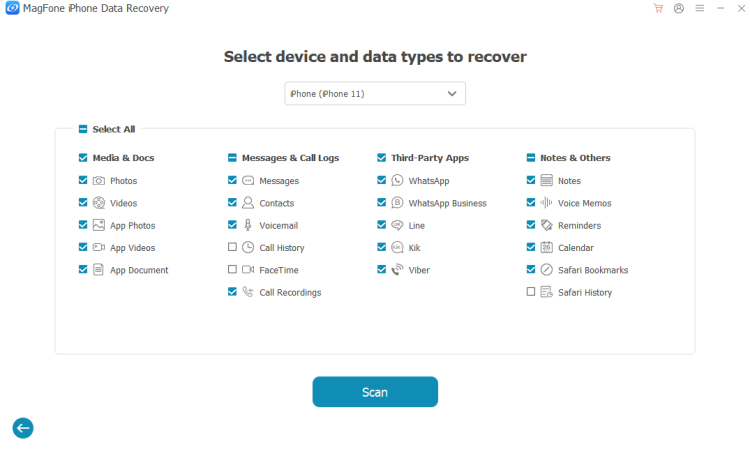
Step 2. Scan and Preview Lost Data on the Device
Then you have to select data types to recover. Here you can choose to restore what only you want. Proceed to click the Scan button to let MagFone deeply scan your device. After scanning, preview all the data on the device by category like photos, videos, contacts, and more.
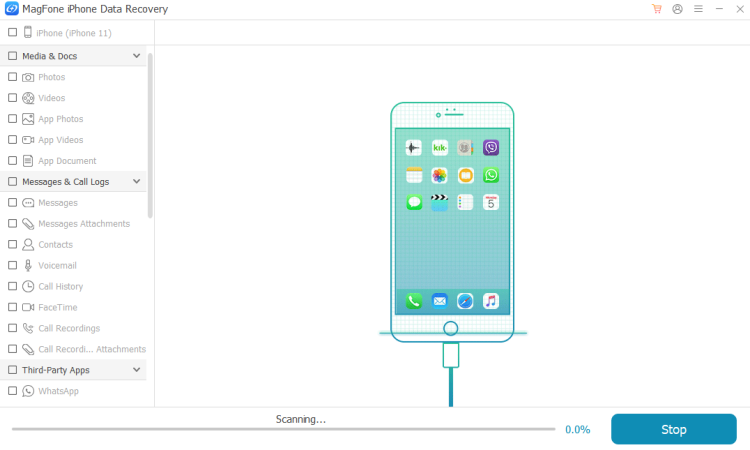
Step 3. Start to Recover Lost Data from the Device
Finally, you can view all the data on the device in the left column. Simply select the files to recover and click Recover to PC to save them to your computer. In the recovery process, keep your device connected to the computer and unlocked.
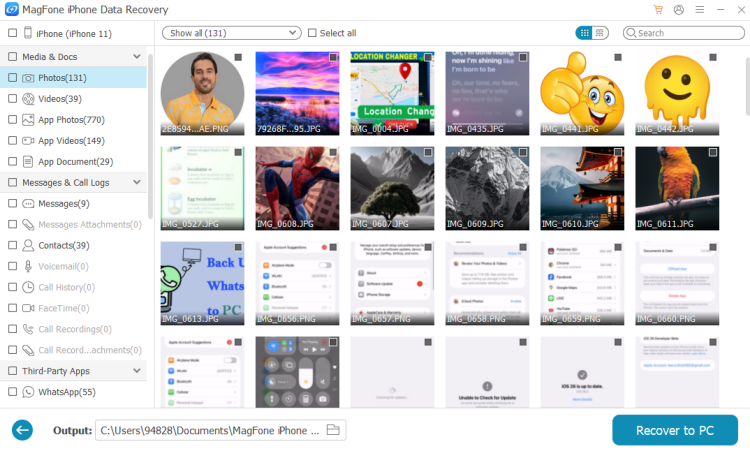
Availability of MagFone iPhone Data Recovery
MagFone iPhone Data Recovery is now available worldwide. Users can download the software directly from the official MagFone website and explore its features through a free trial before upgrading to the full version.
Learn more: www.magfone.com
Download now: https://download.magfone.com/iphonedatarecovery.exe
https://download.magfone.com/iphonedatarecovery.dmg
Contact
For further assistance or inquires, please contact MagFone Marketing Team.
Olivia Wood
Marketing Manager
About MagFone
MagFone is dedicated to developing innovative mobile utility software focused on data recovery, device unlocking, and app data transfer. With a commitment to user-centric design and cutting-edge technology, MagFone empowers individuals and businesses to take full control of their iOS and Android devices with ease.

Disclaimer: The views, suggestions, and opinions expressed here are the sole responsibility of the experts. No Weekly Central USA journalist was involved in the writing and production of this article.
